
SEO & Sitemap
Page titles and metadata, JSON-LD structured data, the build-time sitemap.xml and robots.txt, and how the admin Seo-Settings relate to the website.
The website is a static export: every page is a pre-built HTML shell and the content is loaded in the browser. That shapes what search engines see. Static metadata is in the HTML; ad, category, blog and job details are added by JavaScript after load. Google renders JavaScript, but other crawlers and link previews (Facebook, WhatsApp, X) only see the static part.
Page titles and metadata
Default (all pages)
export const metadata: Metadata = {
  metadataBase: new URL(SITE_URL),
  title: { default: `${APP_NAME} — ${APP_TAGLINE}`, template: `%s · ${APP_NAME}` },
  description: APP_TAGLINE,
};
Static pages with their own metadata
| Page | <title> | Description |
|---|---|---|
/ | ClassiAds_Hub — Buy and Sell Anything in Just One Click | The tagline |
/search | Search Listings · ClassiAds_Hub | Find anything for sale near you — search by category, price and location. |
/blog | Blog · ClassiAds_Hub | News, tips and updates from ClassiAds_Hub. |
/jobs | Jobs · ClassiAds_Hub | Find your next job on ClassiAds_Hub. |
Edit them in the metadata export of each page.tsx.
Dynamic pages
These set document.title in the browser once the data has loaded. They have no per-item meta description or Open Graph tags in the HTML.
| Page | Title set to |
|---|---|
/ad/<slug> | <Ad title> · ClassiAds_Hub |
/category/<slug> | <Category> for sale · ClassiAds_Hub |
/seller/<id> | <Name> — Seller Profile · ClassiAds_Hub |
/blog/<slug> | <Post title> · ClassiAds_Hub |
/jobs/<slug> | <Job title> · ClassiAds_Hub |
/page/<key> | <Page title> · ClassiAds_Hub |
JSON-LD
Two pages add a <script type="application/ld+json"> block (rendered client-side):
| Page | Type | Fields |
|---|---|---|
| Ad detail | Product | name, description, image[], category, offers (price in major units, priceCurrency, availability = InStock or SoldOut, url = SITE_URL/ad/<slug>) |
| Job detail | JobPosting | title, description, employmentType (upper case), hiringOrganization.name, jobLocation (city) |
Test them with Google's Rich Results Test on a live URL.
sitemap.xml
src/app/sitemap.ts is a Next.js metadata route with dynamic = "force-static". It runs once, during `npm run build`, and writes out/sitemap.xml.
| Entries | Source | changefreq / priority |
|---|---|---|
/, /search, /blog, /jobs, /page/about, /page/terms, /page/privacy, /page/contact, /login, /register | Fixed list | daily 1.0 … yearly 0.2 |
/category/<slug> for every active category | GET /categories | daily, 0.7 |
/ad/<slug> for the first 50 ads (featured first, then newest), lastModified = publish date | GET /ads?per_page=50 | weekly, 0.6 |
/blog/<slug> (first page of posts) | GET /blog | monthly, 0.4 |
/jobs/<slug> (open jobs) | GET /jobs | weekly, 0.5 |
The data is fetched from FUNCTION_API in src/lib/config.ts, and all URLs start with SITE_URL. If the API cannot be reached, the build still succeeds with the fixed list only.
Submit https://www.yourcompany.com/sitemap.xml in Google Search Console.
robots.txt
src/app/robots.ts (also static) writes:
User-Agent: *
Allow: /
Disallow: /dashboard
Disallow: /checkout
Disallow: /login
Disallow: /register
Disallow: /verify-otp
Disallow: /forgot-password

Host: https://www.yourcompany.com
Sitemap: https://www.yourcompany.com/sitemap.xml
Admin Seo-Settings
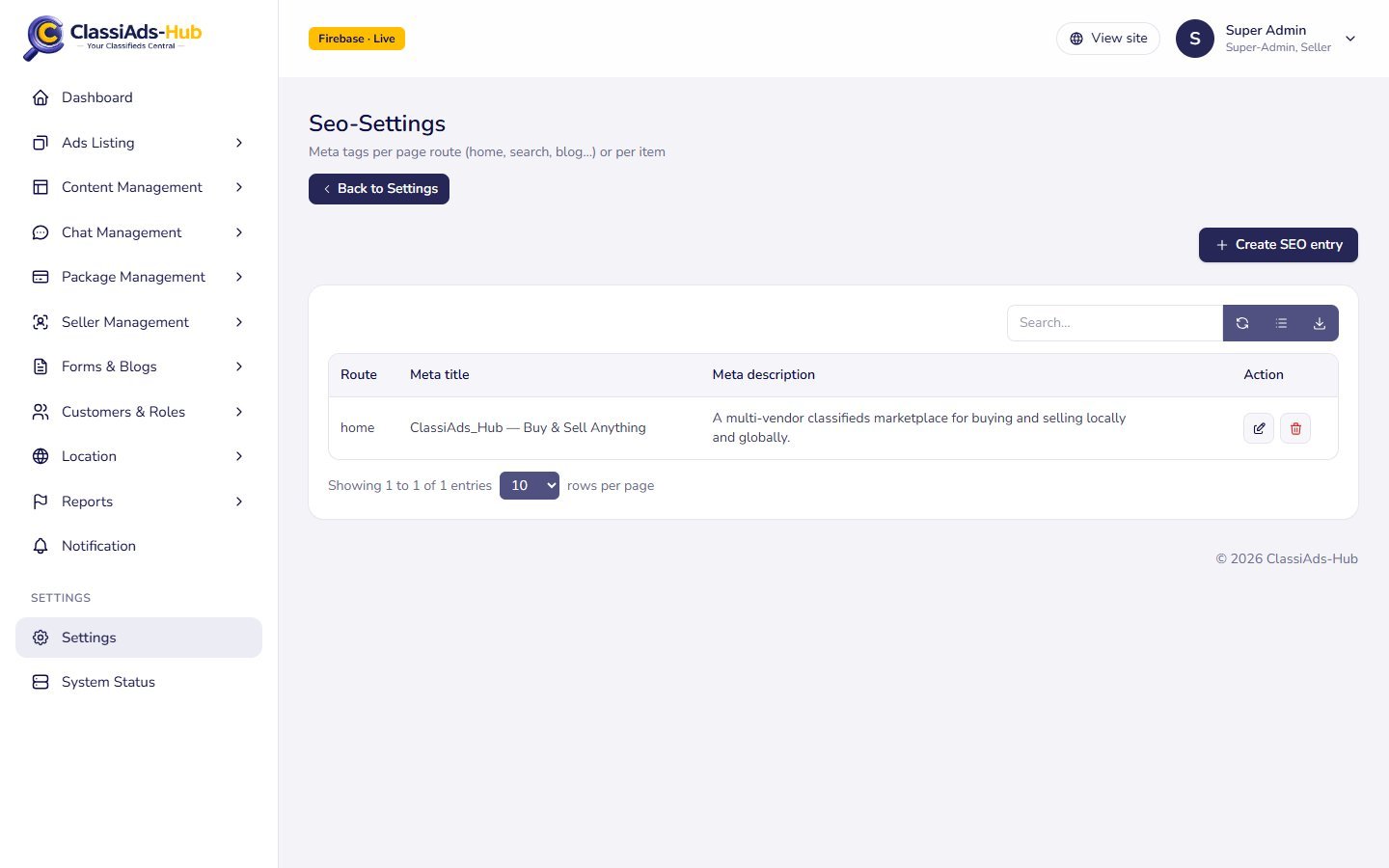
Admin → Settings → Seo-Settings stores meta entries in the seo_meta collection:
| Field | Example |
|---|---|
| Route key | home, search, blog, jobs, packages |
| Meta title | — |
| Meta description | — |
| Keywords | — |
| OG image URL | — |
The API serves them at GET /seo?route=<key> or GET /seo?type=ad|category|blog&slug=<slug> and falls back to the item's own title and excerpt or description, then to the app name and tagline.
Checklist
- Set
SITE_URL(orNEXT_PUBLIC_SITE_URL) to the final domain before building. - Replace
ClassiAds_Hubin titles and descriptions with your brand (Configuration). - Rebuild after adding lots of ads so the sitemap is current.
- Verify the domain in Google Search Console and submit the sitemap.
Next: Deployment →