
Login, Register & OTP
How users log in with phone or email and a password, register, verify an OTP code, reset a forgotten password and continue with Google through Firebase Authentication.
How a session works
The app combines the REST API with Firebase Authentication:
The API checks the credentials
The app sends the login and password to
POST /auth/login(or the form toPOST /auth/register). The API returns the user profile and an `auth_email`.The app signs in to Firebase
It calls
signInWithEmailAndPassword(auth_email, password). For phone-only accounts the API returns a synthetic email built from the phone number, so phone + password login works through the same Firebase Email/Password provider.Every request carries the ID token
The API client adds
Authorization: Bearer <Firebase ID token>to each call. The Firebase SDK refreshes the token and keeps the session after the app restarts.The device is registered for push
After sign-in, the app sends its FCM token to
POST /auth/devices(fcm_token,platform=android/ios) and again whenever the token refreshes (Push Notifications).
On launch, AuthController waits for the first Firebase auth state. If a user is signed in it loads the profile from GET /auth/me; if that fails it signs out.
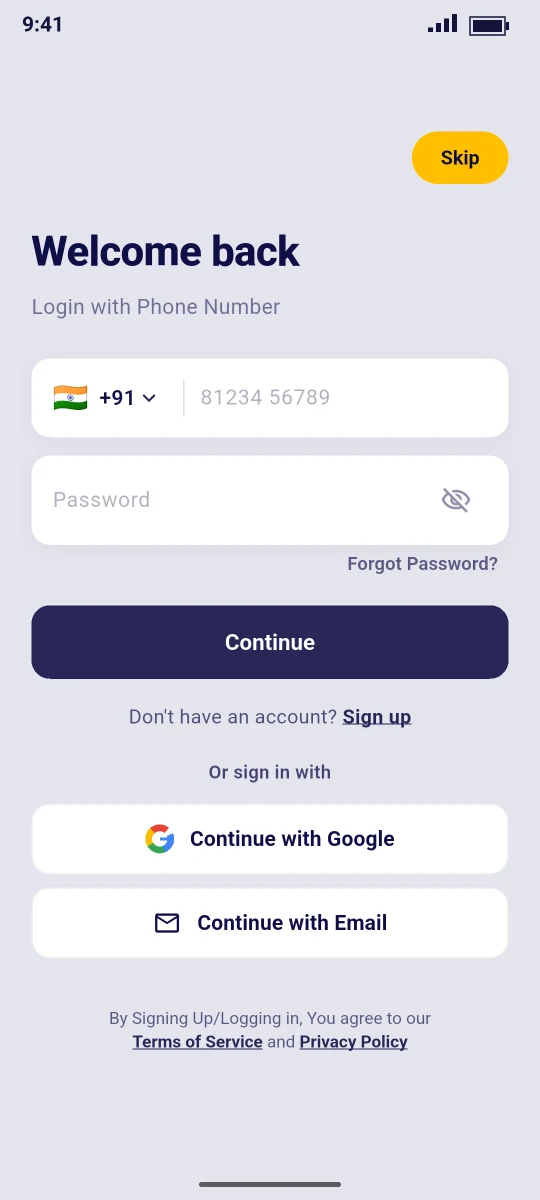
Login screen
Route /login, file lib/features/auth/screens/login_screen.dart.
| Element | Behaviour |
|---|---|
| Skip (top) | Continue as a guest to Home. Guests can browse, search and open ads |
| Title | Welcome back, subtitle Login with Phone Number or Login with Email |
| Phone field | Country picker (flag + dial code) and the number, sent as <dial code><number>, for example +918123456789 |
| Email field | Shown after tapping Continue with Email |
| Password | With show/hide toggle |
| Forgot Password? | Opens the reset flow (below) |
| Continue | POST /auth/login with login and password, then the Firebase sign-in |
| Don't have an account? Sign up | Opens /register |
| Continue with Google | Google sign-in (below) |
| Continue with Email / Continue with Phone | Switches between the phone and email field |
| Footer | By Signing Up/Logging in, You agree to our Terms of Service and Privacy Policy (open the CMS pages /page/terms and /page/privacy) |
The country list is fixed in the file (_countries): India (default), United States, United Kingdom, UAE, Saudi Arabia, Australia, Canada, Germany, France, Spain, Brazil, South Africa, Nigeria, Kenya, Pakistan, Bangladesh. Put your main country first to make it the default.
Where users land after login
The router (lib/core/router/app_router.dart) decides:
- Protected pages (
/post-ad,/myads,/chat,/profile,/favorites,/notifications,/settings,/verification,/saved-searches,/connections,/ad-edit,/reviews,/applications) send guests to/login?next=<page>. After login the user returns to that page. - On the first login the user sees the location prompt before Home (Onboarding & Home).
- A signed-in user who opens
/login,/registeror/forgot-passwordis sent back to Home.
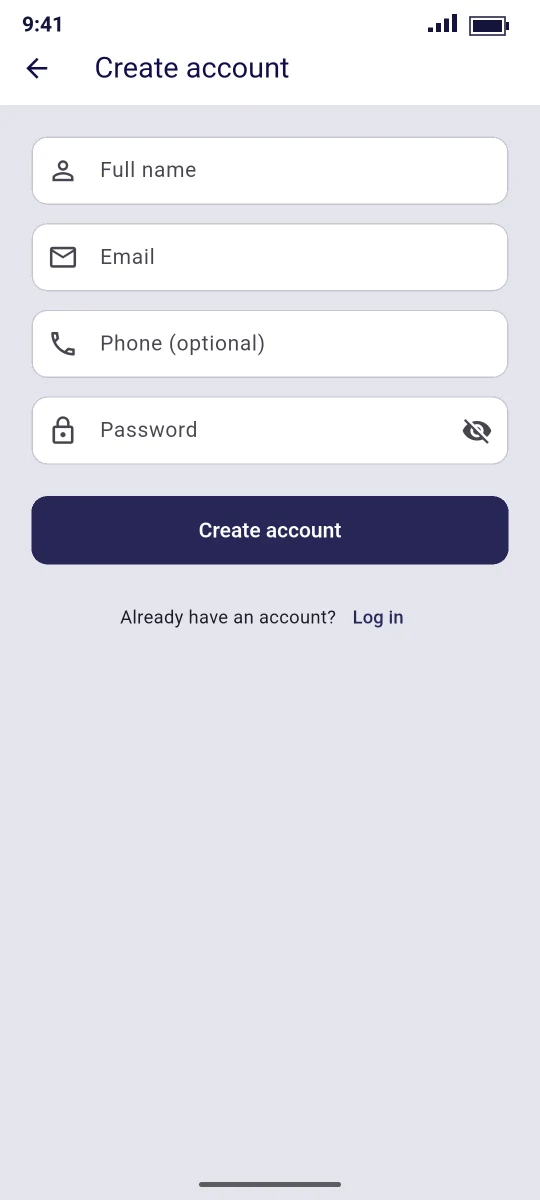
Register
Route /register (Create account).
| Field | Rule |
|---|---|
| Full name | Required |
| Email or phone is required ("Enter an email or phone") | |
| Phone (optional) | Full number with country code, for example +918123456789 |
| Password | At least 8 characters. Sent as password and password_confirmation |
Create account calls POST /auth/register, signs in to Firebase with the returned auth_email and opens the OTP screen for the email (or the phone when no email was given). New accounts get the customer role.
OTP verification
Route /verify-otp (Verify). The screen says Enter the code sent to ….
| Button | API |
|---|---|
| Verify | POST /auth/otp/verify with identifier, purpose (register) and code. On success the API sets email_verified_at or phone_verified_at |
| Resend code | POST /auth/otp/send with channel = email (identifier contains @) or sms |
| Skip for now | Goes to Home. The account works without verification |
Code length and expiry come from the OTP settings in the Admin Panel (code_length, default 6; expiry_minutes, default 10) (Login, OTP & Notification Settings).
Forgot password
Route /forgot-password (Reset password), two steps:
| Step | Fields | API |
|---|---|---|
| 1 | Email or phone → Send reset code | POST /auth/password/forgot with login. The response always says "If the account exists, a reset code has been sent." |
| 2 | Reset code, New password → Reset password | POST /auth/password/reset with login, code, password, password_confirmation |
After a reset the user sees "Password reset — please log in" and returns to the login screen. With the log OTP provider the reset code is pre-filled and shown as Dev code, like the OTP screen.
Continue with Google
The app uses Firebase's own Google provider, with no google_sign_in package:
final provider = GoogleAuthProvider()
  ..addScope('email')
  ..addScope('profile');
final credential = await _auth.signInWithProvider(provider);
After the Google account is picked, the app calls GET /auth/me. The API links the Firebase identity to an existing user with the same email, or creates a new customer profile.
To make it work:
Enable the provider
Firebase Console → Authentication → Sign-in method → Add new provider → Google → Enable, choose a support email, Save.
Add every SHA-1 and SHA-256
Project settings → Your apps → Android app: the debug key, the upload key and (after the first Play upload) the Play App Signing key (Firebase Setup).
Download google-services.json again
Replace
mobile/android/app/google-services.json. The new file contains the OAuth client.Configure the OAuth consent screen
Google Cloud console → APIs & Services → OAuth consent screen: app name, support email, logo, your website domain, privacy policy and terms URLs. Set the publishing status to In production so any Google user can sign in.
Rebuild
Run the app again (or build a new AAB) and test Continue with Google on a real phone.
| Error | Cause |
|---|---|
DEVELOPER_ERROR / code 10 | A SHA-1 is missing in Firebase, or the app still has the old google-services.json |
| Works locally, fails from Play | The Play App Signing SHA-1 was never added |
| Google sign-in failed | Provider not enabled, or no network |
A signInWithApple() method also exists in firebase_auth_service.dart, but the login screen has no Apple button. If you publish on iOS with Google sign-in, Apple's guidelines may require Sign in with Apple. Add a button that calls it and enable the Apple provider in Firebase.
Sign out and account deletion
Profile → Sign out (icon in the app bar) asks for confirmation, signs out of Firebase and returns to the login screen. Account deletion is described in Profile, Verification & Account Deletion.
Next: Onboarding & Home →