
Introduction
Go4Ride is a taxi, intercity, rental and parcel booking platform on Firebase. It includes a Flutter Customer App, a Flutter Driver App, a Flutter Web Admin Panel and a serverless backend.
Welcome to the Go4Ride documentation. Go4Ride runs a ride-hailing business from one platform: riders book a city cab, an intercity ride (shared or personal), an hourly rental or a parcel delivery; drivers register, upload their documents, go online and complete trips with a start OTP; and you manage the fleet, pricing, payments and support from the admin panel.
This guide takes you from the downloaded package to a live service. You create your own Firebase project, deploy the backend, install the admin panel, then brand and publish the two mobile apps.
What is included
| Part | Folder | What it does |
|---|---|---|
| Customer App | apps/customer_app/ | Flutter app for Android & iOS. Phone OTP login, booking for Cab, Intercity (sharing / personal), Rental and Parcel, live ride screen with OTP and SOS, cancellation, ride history, wallet with online top-up, help & support tickets |
| Driver App | apps/driver_app/ | Flutter app for Android & iOS. Phone OTP login, vehicle details and KYC documents, online / offline with live GPS, ride requests with an accept timer, the full trip workflow, earnings, wallet, withdrawals and subscription plans |
| Admin Panel | apps/admin_panel/ | Flutter Web console with a black & white UI, light / dark mode and a collapsible sidebar: dashboard, bookings, dispatch, SOS, customers, drivers & KYC, live map, support, catalogue, growth, finance, roles and 22 settings pages |
| Shared packages | packages/ | core (models and enums), data (Firestore repositories), services (maps, location, notifications), ui_kit (theme and brand) |
| Backend | functions/ | 19 Cloud Functions (2nd gen, TypeScript, Node 20): callables, Firestore triggers, two scheduled jobs and the payment return page |
| Rules | firebase/ | Firestore rules and indexes, Storage rules and Realtime Database rules. tests/rules/ holds the rules test suite |
The repository is a pub workspace (one flutter pub get at the root resolves every app and package).
How Go4Ride is put together
Go4Ride has no server to rent. There is no VPS, PHP or MySQL. Everything runs in your Google Firebase project:
- Firebase Authentication signs riders and drivers in with phone OTP, and admin users with email and password. A custom claim on each account carries the role:
admin,staff,dispatcher,driverorcustomer. - Cloud Firestore stores rides, users, drivers, payments, the catalogue and all settings. Security rules decide what each role may read and write.
- Realtime Database holds the live position of every online driver (
driver_locations). The admin's live map and the rider's tracking read it. - Cloud Storage keeps KYC documents, profile photos, support attachments and admin uploads (banners, icons, logos).
- Cloud Functions do everything that touches money or privileges: dispatching ride requests, settling commission, charging cancellation fees, online payments, payouts, subscriptions, KYC decisions, staff accounts and push broadcasts.
- Firebase Cloud Messaging (FCM) delivers ride updates and admin broadcasts to both apps.
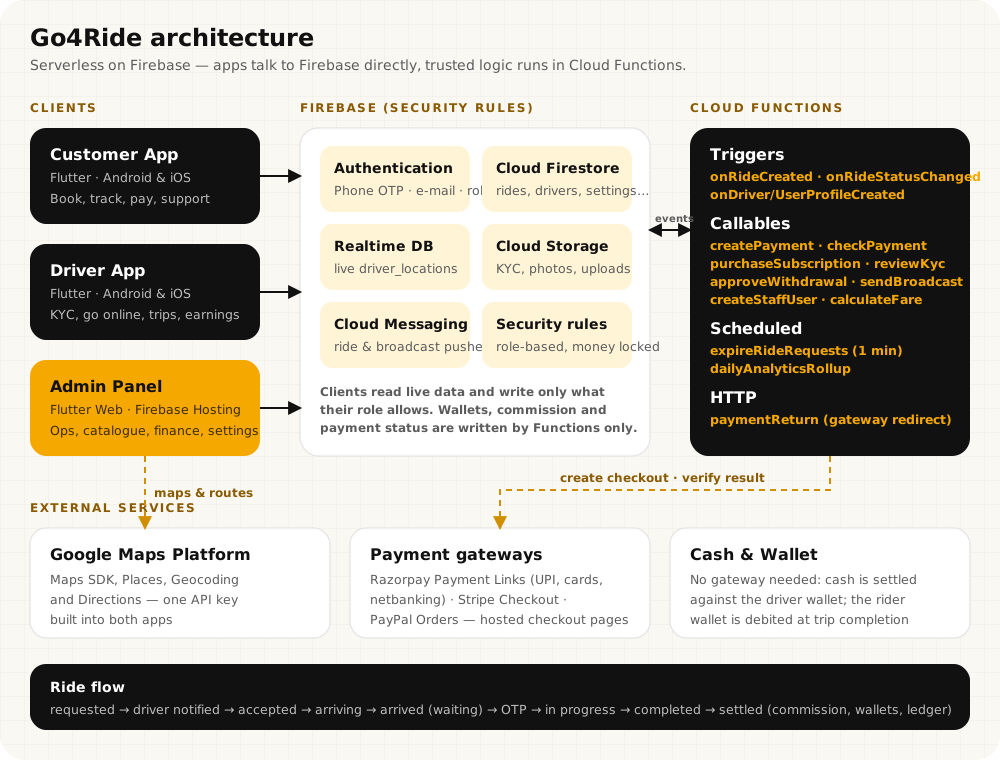
Who does what
| Action | Done by |
|---|---|
| Booking a ride, moving it through its statuses | The apps, writing the rides document (rules block fare and payment fields) |
| Notifying nearby drivers, closing unanswered requests | onRideCreated trigger and the expireRideRequests job (every minute) |
| Commission, driver earnings, wallet debits at completion | onRideStatusChanged trigger, once per ride (settledAt) |
| Online payments (Razorpay, Stripe, PayPal) | createPayment, paymentReturn, checkPayment |
| KYC decisions, payouts, staff accounts, broadcasts | Admin-only callables: reviewKyc, approveWithdrawal, createStaffUser, sendBroadcast … |
Key features
- Four services: City cab, Intercity (sharing or personal), Rental (hourly packages) and Parcel. Each can be switched off in Services.
- Vehicle types with their own fares: Bike, Auto, Mini, Sedan, SUV (or your own) with base fare, per km, per minute and minimum fare.
- Driver KYC: you decide which documents are required, one or two sides, with or without an expiry date. Approve or reject each document, then the driver.
- Smart request dispatch: only online, approved, unblocked drivers inside the search radius and above the minimum wallet balance get the request.
- Trip workflow with OTP: accepted → on the way → arrived (with free waiting time and a waiting timer) → 4-digit OTP → in progress → completed.
- Payments: Cash, Go4Ride Wallet and online through hosted checkouts: Razorpay (UPI, cards, netbanking), Stripe and PayPal. Every payment is verified on the server.
- Commission or subscriptions: a percentage or fixed commission per ride, or driver plans that waive commission while they are active.
- Cancellation fees with a free window, paid to the driver.
- Payouts: drivers request withdrawals, you approve and mark them paid.
- Safety & support: SOS from an active ride for riders and drivers, help tickets with photo and live chat.
- Staff roles: employees and dispatch users with per-module permissions.
- Maintenance mode and minimum app versions that take effect in the apps immediately.
Tech stack
| Layer | Technology |
|---|---|
| Mobile apps | Flutter 3.41 / Dart 3.11, Riverpod, GoRouter, Google Maps SDK |
| Admin Panel | Flutter Web, Riverpod, flutter_map with OpenStreetMap tiles for the zone and live maps |
| Backend | Cloud Functions 2nd gen, Node.js 20, TypeScript, firebase-admin |
| Database & files | Cloud Firestore, Realtime Database, Cloud Storage |
| Auth & push | Firebase Authentication (phone OTP, email/password), Firebase Cloud Messaging |
| Maps APIs | Maps SDK for Android & iOS, Places, Directions, Geocoding |
| Local development | Firebase Emulator Suite (Auth, Firestore, RTDB, Functions, Storage) |
The recommended path
Check the requirements
Read Requirements and Third-Party Service Costs so every account is ready.
Create Firebase and deploy the backend
Install the admin panel and create your admin
Admin Panel Installation, then Create the First Admin, then work through the Setup Guide.
Brand and publish the Customer App
Prerequisites, package name, branding and release.
Brand and publish the Driver App
Prerequisites, package name, branding and release.
Where to go next
Admin Panel Overview
What the panel manages and how access works.
Installation Overview
What gets installed, in which order.
Customer App
Booking, tracking, wallet and payments for riders.
Driver App
Registration, KYC, going online and the trip workflow.
Backend Reference
Cloud Functions, the data model and security rules.
FAQs
Quick answers to common setup questions.